
HELP / CHECK THE SIMPLE THINGS FIRST
Troubleshooting
Find the overlay, resolve shortcut problems and check game compatibility.
The overlay does not appear
Check the Windows notification area, including hidden icons. Start StarRupture and load a world, then check the display controls in the app's menu. Make sure your game matches the supported build shown in About and the release notes.
Return focus to the game. Fullscreen overlays hide while another app has focus. If they still do not appear, try Borderless. Other windows can cover the overlay. In Update 3, the compass also hides during pause or while the game's mouse cursor is visible.
Check the connection state
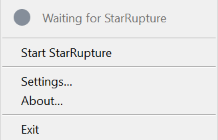
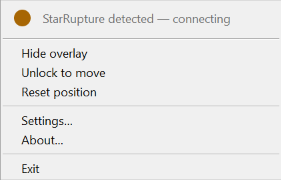
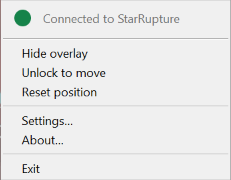
The tray menu shows whether the app is waiting for the game, connecting or connected.
The timer is missing or shows --:--
In 1.2.0, make sure the wave timer is enabled and the current stage is checked under Visible stages. The panel also hides when the overlay can’t determine the stage. Dashes indicate unavailable timing. Wait for the world to finish loading, then check About for connection status and supported game details. If the game has updated, check for a compatible overlay release.
The Codex does not open
Use the Update 3 overlay, focus the game and press K from gameplay. The catalogue may take a moment to appear the first time you open it.
Alt+X does nothing
Keep the game focused. At the recipe station, hover over an unfinished recipe row and press the shortcut. Check Settings > Recipe tracker for preparation progress or a shortcut conflict. Try another shortcut if Windows or a different app already uses Alt+X.
Update 2 supports one pin and keyboard controls. Update 3 supports three pins and double-clicking recipe icons or names. Check the double-click setting if that control is not working.
Recipe setup cannot finish
Make sure Steam has finished installing or updating the supported game and load a world. Disable Recipe tracker and Save, then enable it and Save again, or restart the overlay.
Recipe information is prepared and cached locally. No game assets are uploaded. If a game update changes the files the overlay reads, check for a compatible overlay release.
Update 3 pins do not return
The Update 3 overlay restores pins after restarting and switching between local worlds. Check that you are using the latest Update 3 overlay and loading the world where you pinned the recipes. If the problem continues, include these steps in a bug report.
The compass does not appear yet
In 1.2.0, it waits for the map unlock by default. Pick From the start under Settings > Compass > Show compass to see it earlier.
The arrival cue appears on another level
The compass uses horizontal distance. It does not measure elevation or plot a walking route. Check your marker's height in the game and adjust the arrival distance in Settings if needed.
Report a problem
Open About and use Copy support details. Describe what happened and how to reproduce it. Include a screenshot if useful, with personal information removed. Keep saves, settings, caches and memory dumps private.
Report a bug or suggest a feature ↗For suspected security vulnerabilities, use the repository's security reporting guidance. Pull requests and code contributions are not accepted.